
Portfolio and Actual investment
The simulator has two tabs. Portfolio runs a contribution plan through one ticker or a weighted basket of up to five. Actual investment turns the Quant Lab's Top-N Market Cap and Momentum rules into a month-end list of what to sell, buy, and keep.
Portfolio
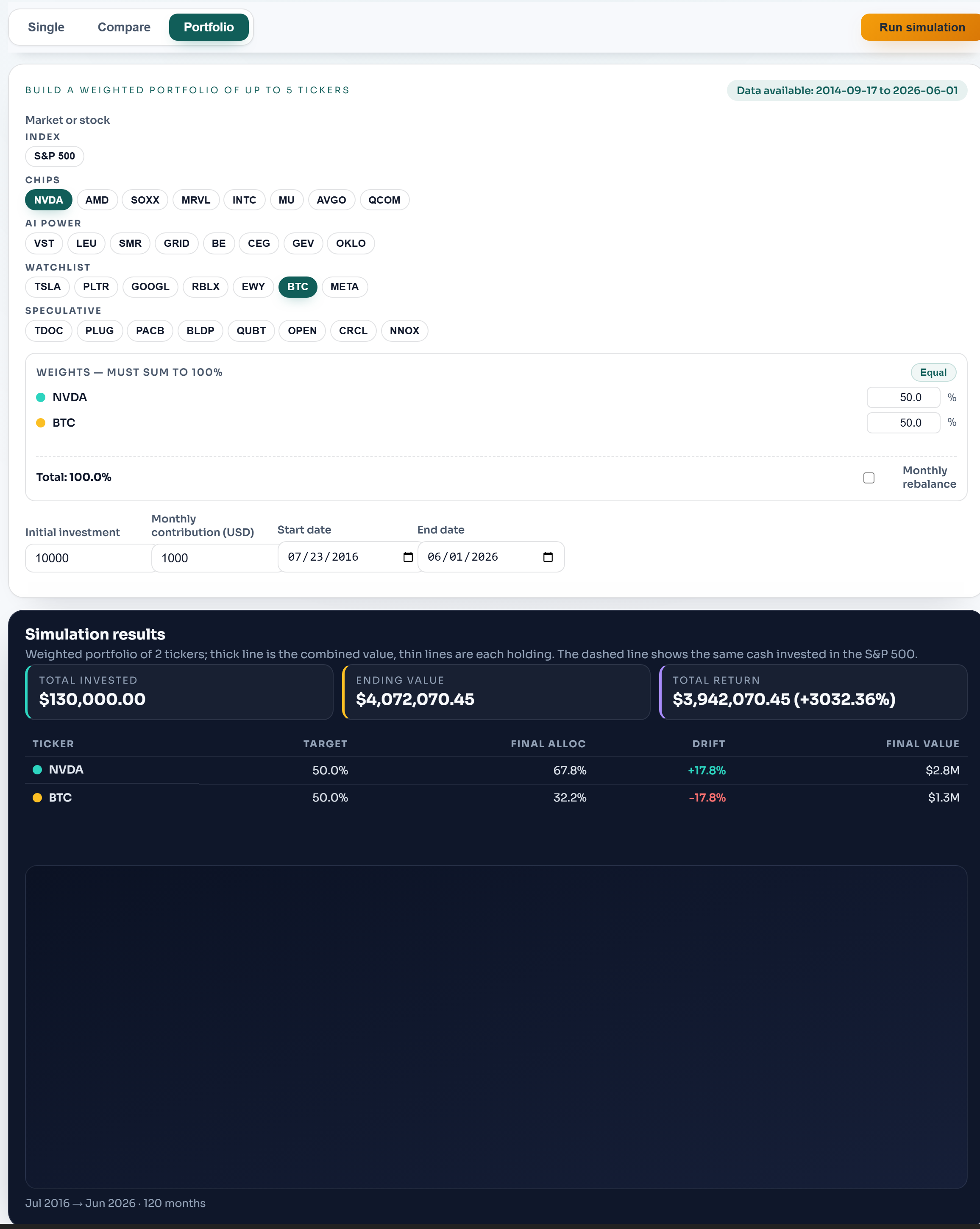
Set an initial investment (a one-time deposit), a monthly contribution, and a start and end date. Set the monthly amount to zero for a pure lump-sum test, or the initial deposit to zero for pure dollar-cost averaging. Then pick tickers from the grouped buttons (Index, Chips, AI Power, Watchlist, Speculative) and press Run simulation.
Assign a weight to each ticker (or press Equal to split evenly); weights must sum to 100%. Turn on Monthly rebalance to reset to your target weights each month, selling winners and topping up laggards. With it off, holdings drift with prices.
The thick line is the combined portfolio value; the dashed line is the same cash invested entirely in the S&P 500, so every plan is judged against simply owning the index. The table shows each holding's target weight, final allocation, drift, and final value.
One ticker, or several side by side
Test one asset: select a single ticker. It gets 100% weight, and the result is that one stock or index against the dashed S&P 500 line. Compare tickers: the per-ticker table lists each holding's ending value. To see what the same cash would have done in each one separately, run them one at a time with the same dates and amounts. The range automatically starts where the youngest selected ticker has data.
Custom boxes
Below Speculative are three Custom boxes. Type any current S&P 500 ticker (for example COST or JPM) and press Enter; the box turns green when the stock is added. Clear a box to remove its stock. Custom stocks use the Quant Lab's month-end closes, lined up with the next month's first observation so they mix with the button tickers. Tickers outside the S&P 500 aren't available.
Actual investment
This tab answers "what do I trade at the month-end?" for two Quant Lab methods: Top-N Market Cap (the largest companies) and Momentum (the strongest 12-month returns). Choose how many to hold (3, 5, or 10), how often you rebalance, and for Momentum the ranking timing: Same month (default), Prior month (the classic one-month skip), or Confirmed (only stocks in both rankings, so possibly fewer than N).
The official card ranks at the last completed month-end and compares the result with the list from your previous rebalance (one, three, six, or twelve months earlier). It lists what to sell, buy, and keep, each with its rank and market cap or 12-month return. Every holding gets an equal share. If the current month isn't one of your rebalance months, no trade is needed.
While a month is still in progress, a dashed preview card shows what the list would be if the month ended at the latest close. It isn't a trade signal: prices can change before the month-end.
The lists follow the backtest rules exactly, including their limits: current index members and share counts, month-end closes, no taxes or fees. See the Top-N Market Cap and Momentum guides for the selection rules.
Initial and monthly deposits both start at the first selected observation, and monthly deposits include the final observation. Adjusted stock prices may reflect dividends; the S&P 500 benchmark is price-only. See data methodology.